HDS ViewStation Audio Operation
This section discusses hardware and software requirements for using the Audio features of the HDS ViewStation.
Audio Operation Hardware
The HDS ViewStation Audio option includes a PC Card board with an Audio board installed. It also includes an internal speaker and audio input and audio output jacks on the ViewStation's backpanel.
Additional audio equipment is available from HDS, including an integrated speaker and microphone with echo cancelling. Microphones and stereo speakers (external) are available from HDS. Other compatible audio equipment is available from commercial suppliers.
Audio Device Setting Menu in Setup Mode
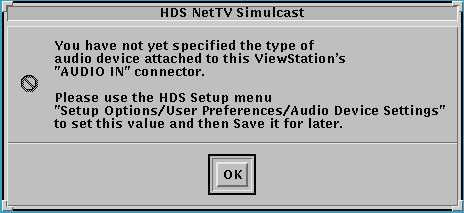
When you start an Audio or Video client without first selecting an audio input device, a message appears requesting the setting:
The Audio Device Setting line in the User Preferences menu brings up a submenu for selecting the audio input and output devices you are using on your ViewStation.
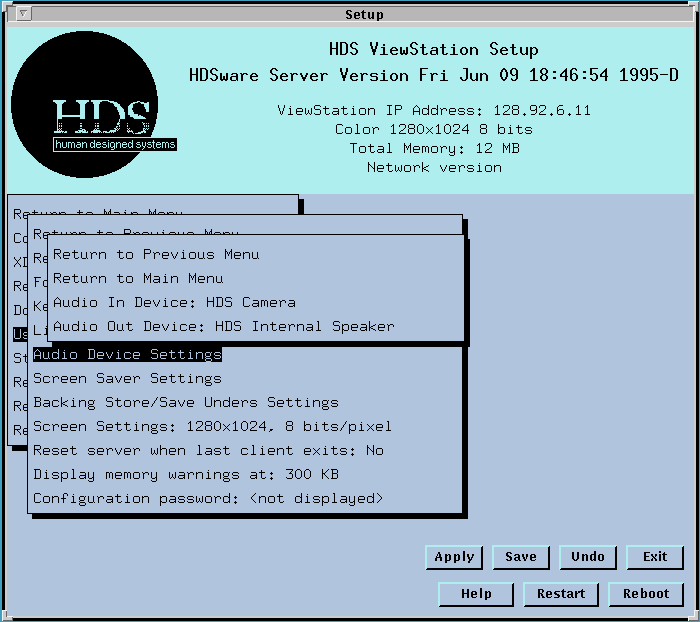
The Audio In Device line toggles between several input devices, HDS Camera (with built-in microphones), HDS headset, the CallPort integrated Speaker/ Microphone (with echo-cancelling), HDS microphone, HDS tuner, VCR, and Line Level Audio. This setting selects the appropriate input level for the HDS audio device. These settings can also be made in the HDS audio client.
If you are using your own audio equipment, you will have to determine which input level settings are appropriate.
The Audio Out Device line toggles between several output devices, HDS internal speaker, HDS external speakers, HDS headset, and the CallPort integrated Speaker/Microphone (with echo-cancelling).
If you are using your own audio equipment, you will have to determine which output level settings are appropriate. BE SURE TO SAVE THESE SETTINGS in NVM so they are available to the Audio client when it is started.
ViewStation Audio Client Overview
This section includes the HDS audio man pages as well as associated audio programs that run on the HDS ViewStation, as follows:
hdsaudio Client
This page describes the hdsaudio client, including its manual page.
hdsplay Client
This page describes the hdsplay client, including its manual page.
hdsrecord Client
This page describes the hdsrecord client, including its manual page.
auhds Client
This page describes the auhds client, including its manual page.
Using HDS Audio with Application Programs
This page gives an example of using the HDS audio clients from an application program.
HDS Audio Hardware Specification
This page gives the specifications for the ViewStation's audio operation.
NetAudio Client Manual Pages
This is the manual page for NetAudio, an X Audio protocol supported by the ViewStation.
 Return to the Home Page