Click on the Setup Options button of the Main Menu.
Communications Options Selection This pull-down menu contains settings for a number of communications options, including network addresses and other Ethernet configuration information
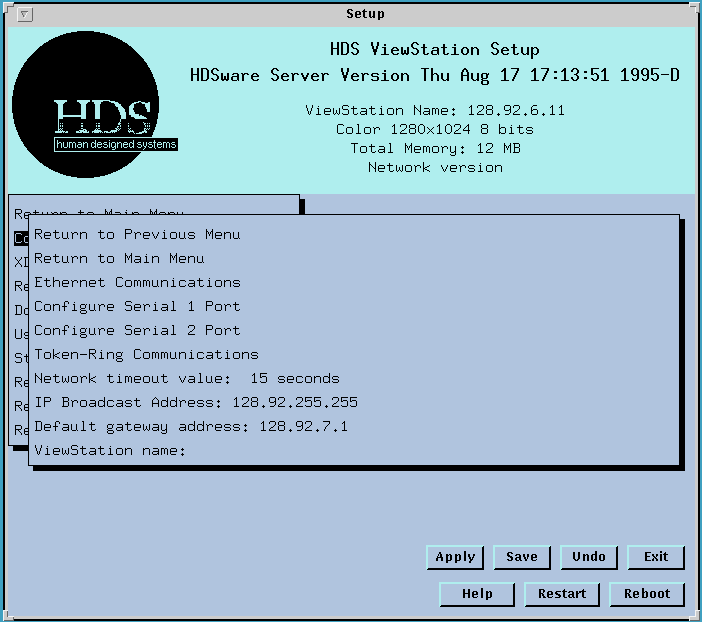
Ethernet Communications Menu
This menu gives you settings for your Ethernet communications.
Configure Serial Port 1 (and 2) Menu
This menu gives you settings for your Serial Ports (Port 1 or Port2).
Token Ring Communications Menu
This menu gives you settings for your Token Ring communications.
Network Timeout Value
The Network timeout value field sets the time interval that a request waits for a response. If you make a request to logon to some host on the network, the request will wait for the specified length of time before it either makes the connection, or gives up and ends the request process. If your timeout value is 15 seconds, a logon request will fail if it has to wait longer than 15 seconds. This value should be some brief time, 15 or 20 seconds, (based on the host's response time and load) so you will know a process has failed without too much waiting.
IP Broadcast Address
The IP Broadcast Address field sets the network wildcard address, typically 0.0.0.0 or 255.255.255.255. The system administrator sets the correct value for this field.
Some systems prefer to use a local network broadcast, such as 128.91.0.0 or 128.91.255.255. Your system administrator will choose this value.
Default Gateway Address
The Default Gateway address field lets you specify a gateway host. A gateway host computer is a computer on your local network that connects to other networks. Refer also to the discussion on IP Addresses and Network routing on the ViewStation.
ViewStation Name
The ViewStation Name field lets you enter the ViewStation's name, which is used in name resolution on the network (if available to a name server or entered in the host's /etc/hosts file) and also as the display name in the ViewStation's setting of the display environment variable (with keystrokes Alt-F12, etc.).
 Return to the Home Page