Configure Serial Port 1 Menu
This menu allows you to select the operation for serial port 1, the RJ11 port. The Configure Serial Port 2 menu allows you to select the operation for Serial Port 2, the DB25 port on the optional Communications board.
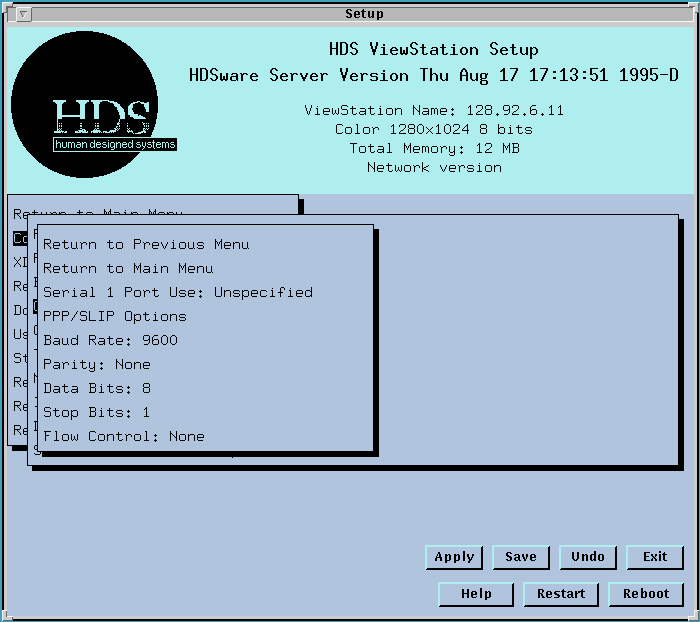
The options include:
The field Serial 1 Port Use (or Serial 2 Port Use) determines how the particular serial port is used; it has options
Unspecified,
Normal SLIP,
Compressed SLIP,
PPP, or
Console (the Console entry is discussed in Console Window Operations).
This is the assignment of the logical port to a connector. Choose one of these configuration options, such as PPP or CSLIP (this compressed format uses "Van Jacobsen compression", RFC 1144; the remote host must also use this technique to decompress the data it receives).
CAUTION: Select PPP, or SLIP options only if that is your only connection. If you have other connections to the host or Ethernet and use PPP only occasionally, you should select "Unspecified" as your serial port use and use the "Start PPP" option on the pull-down menu of the HDSterm serial window. The reason for this "Unspecified" selection is that if "PPP" is your Serial Port Use selection, the ViewStation will send repeated requests to the host to start the PPP daemon, even if you aren't currently using a PPP session.
PPP and other TCP/IP Serial Connections
PPP/SLIP Options Menu
These two pages give you more details about the PPP settings and interface.
Communications Settings
Now set the communications settings as required by the remote host connection, things like baud rate, parity, etc. When you have made all your selections, click on Apply Settings, (Save in NVM if you wish) and exit Setup Mode. When you try to log onto the remote host you specified for CSLIP (using Telnet), the ViewStation opens the CSLIP communications port using the settings you specified. (Note that the communications interface is forced to 8 data bits and no XON/XOFF when using SLIP or CSLIP. Most Unix systems use 7 data bits and Even parity with their serial connections; the parity bit is required but ignored on input. SLIP and CSLIP require 8 data bits to communicate. The ViewStation automatically sets its serial ports to 8 data bits, and no XON/XOFF when the SLIP or CSLIP mode is active. The previous communications setting is restored when the SLIP mode is terminated. You shouldn't save settings in NVM while the SLIP interface is active unless you want these SLIP communication values saved for that port.)
You can log onto another host, using either Serial Port or Ethernet, with another Telnet session if you wish. The ViewStation looks at the host address you use in your Telnet session and then selects the appropriate interface as its connection, either the Serial Port 1 or Port 2 remote host, or some other host on your Ethernet network. The Default Telnet host field in Setup Mode lets you select one host as your Default connection. Your remote host addresses for the serial ports should be different; if you use the same remote host address, the last one you set (with Apply settings) will be used.
Note also that some things, like Domain Nameservice, rely on the flexibility and free access to many machines found on a network. If your font host, or name dae mon, are running on a host that is not your SLIP host, they will work correctly if the physical connection to that host is present and active. You should realize that transferring font files over the SLIP serial lines will be slow, so most of these network processes (daemons and servers) should typically be on an Ethernet connection host.
The selection of the physical port should consider that CTS/RTS is the only flow control available, and this is only available on Serial Port 2, the DB25 port. The XON/XOFF flow control can't be used with CSLIP or SLIP. Note also that CSLIP and SLIP protocols must run with 8 data bits and no parity.
 Return to the Home Page