The HDS ViewStation supports Token Ring communications with its PC Card adapter card and a Token Ring "HDS PC Card Token-Ring 16/4 Adapter" card. This is an available option for all ViewStation models.
The ViewStation's Token Ring communication complies with IEEE 802.5 stan dards and uses IEEE 802.2 packet types. With HDSware version 3.2, Token Ring support is built into the bootprom and the Token Ring Communications menu allows your IP address entry and other settings.
Earlier HDSware versions (version 3.0.2 and bootprom v3.0.2-E) required some manual settings and interface control in the configuration file. [If you are using the v3.0.2-E bootprom with 4Mb capacity, you must have a jumper set (position JP7 on the ViewStation FX; position JP6 on ViewStation Ultra) to indicate the higher bootprom capacity. This applies to user upgrades only; factory installation adds the jumper automatically.]
ViewStation local clients, such as the IBM 3270 terminal emulator, add powerful capabilities to the Token Ring communications feature. This terminal emulation permits direct connection to IBM mainframe systems on Token Ring networks (at the same time keeping other ViewStation connections and emulations open).
An additional ViewStation feature, the HDS Developer's Kit, allows ViewStation customers to write and compile their own application programs to run on the ViewStation. This includes OSF/Motif applications which could be used on IBM mainframe computers without having either X or Motif running on the main frame.
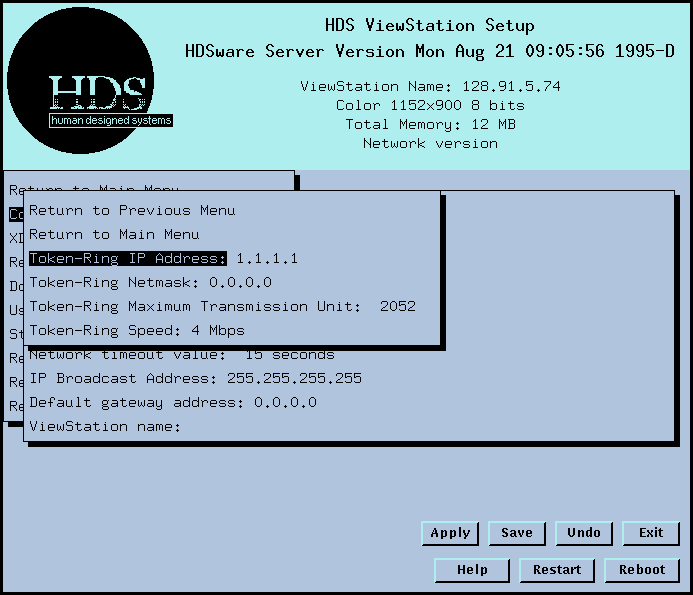
The Token Ring Communications menu offers a number of settings:
The Token Ring IP Address is the ViewStation's IP address on the Token Ring network.
The Token Ring Netmask is the netmask appropriate for the Token Ring network. For a discussion of netmask operation, refer to the Ethernet netmask section above.
The Token Ring Maximum Transmission Unit field lets you set the MTU for your Token Ring network. The default MTU is 2052.
The Token Ring Speed field reports the ring speed. You can select either 4 or 16 Mbps by means of a jumper on the ViewStation's circuit board described below.
Token Ring Specifications
ViewStation Hardware Interface - The HDS ViewStation uses "tr1" to designate the token ring interface to the PC Card internal slot and "tr2" to designate the PC Card external slot.
Token Ring communications can use either shielded twisted pair connectors (called Type 1 cabling) or unshielded twisted pair connectors (called Type 3 cabling). Cable adapters (DB9 or RJ45) are supplied with the Adapter card.
Network cable quality often determines whether 4 or 16 Mb ring speed is appropriate. Token Ring speed is jumper selectable for either 4 Mbps or 16 Mbps. This is controlled by jumpers on the JP9 block for the ViewStation FX and on the JP11 block on the ViewStation Ultra. Jumper pins 5-6 select the ring speed for the inter nal PC Card slot and jumper pins 7-8 select the ring speed for the external PC Card slot. Ring speed 4 Mbps is selected when the jumper is in place, and ring speed 16 Mbps is selected when the jumper is off. This configuration should be selected with the initial ViewStation order so the correct configuration is installed, tested, and shipped.
ViewStation Software Interface
The hardware interface is used in the boot monitor to set the Token Ring IP address and netmask as follows (tr1 designates the internal PC Card slot and tr2 designates the external slot). You can make these settings in the Setup Mode menu above, or in Monitor Mode at boot time, or in the configuration file:
ip trx nnn.nnn.nnn.nnn
nm trx nnn.nnn.nnn.nnn
ViewStation Token Ring communications supports source routing, so it will work on bridged networks. BOOTP and XDMCP are supported on the Token Ring network for both direct and broadcast access.
ViewStation Token Ring Controls
From the ViewStation's Console window, the "srt" shell command displays, adds, and deletes source route entries for token ring communications.
srt -- displays all source route entries
srt -s -- add/modify a source route entry
srt -d -- delete a source route entry
If the Token Ring adapter becomes unplugged from the Token Ring network, the user can issue a command to re-insert the adapter onto the network:
ifconfig trX up (where trX = tr1 for the internal
slot and tr2 for the external slot)
This reconnects the token ring adapter. The "token" shell command displays token ring interface statistics.
 Return to the Home Page