Ethernet Communications Menu
The Ethernet Communications field brings up another menu which allows you to set the netmask and gateway addresses for your Ethernet network. These are discussed below:
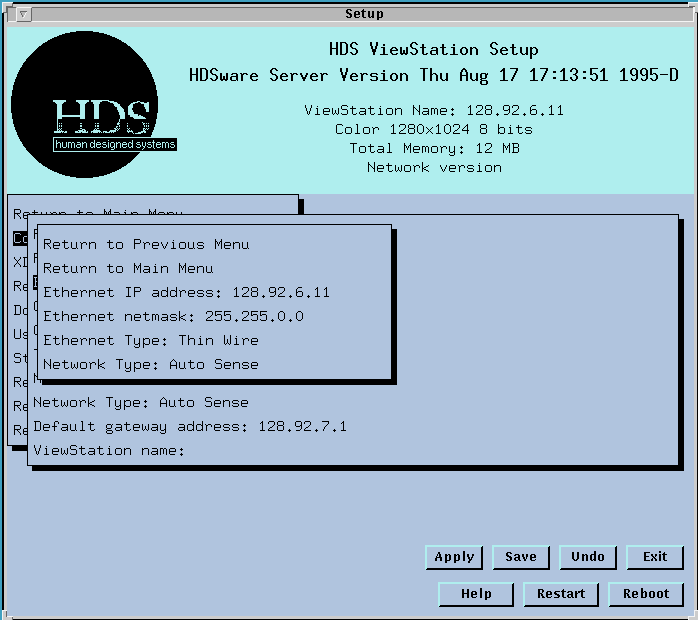
The Ethernet gateway address field gives the address of a device (host computer) on your local network that connects to other networks. This field is password protected.
The Ethernet netmask field specifies which parts of the your IP address must match the IP addresses of other devices on the local network. If the indicated parts of the addresses don't match identically, a gateway host computer must be used to obtain access to those other addresses.
For instance, entering a netmask of 255.255.0.0 means that the first two groups of numbers in the address must match identically, but that the last two groups can be any numbers. Thus, if your IP address is 128.91.2.2, you can connect directly to any other devices with addresses 128.91.nnn.nnn. You would have to use a gateway to connect to a device with an address 128.92.nnn.nnn. The netmask setting defines the addressing characteristics of your local network.
In precise terms, access to the gateway is based on the comparison between the result of a logical AND operation with the ViewStation IP address and the network mask to the result of a logical AND operation with the host IP address and the network mask. If the comparison shows identical values, the address is on the local network. If the comparison shows different values, access must be obtained through the gateway. This field is password protected.
The Ethernet Type field selects the Ethernet type. The ViewStation has Twisted-pair as its factory configuration, with ThinWire and ThickWire Ethernet on an optional Communications board. The Twisted-pair interface is sensed automatically when connected, so no setting is necessary in Setup Mode. The Setup Mode setting is for ThinWire. You can also select ThickWire. These selections are discussed more fully in Ethernet Connections.
The Network Type field specifies whether you are using a generic Ethernet or IEEE 802.3 ethernet type. The default setting is Auto-Sense, which automatically detects which type is in use and sets it for the ViewStation.
 Return to the Home Page