HDSperx Audio Control client - hdsaudio
The HDS audio program is downloadable ViewStation local Motif client which provides a control panel which allows the user to set various audio parameters for presentation on the ViewStation.
The HDS audio client executable is called /HDSware/hds- fx/bin/hdsaudio on the HDSware distribution (version 3.0 and higher).
The Audio Control client is shown below:
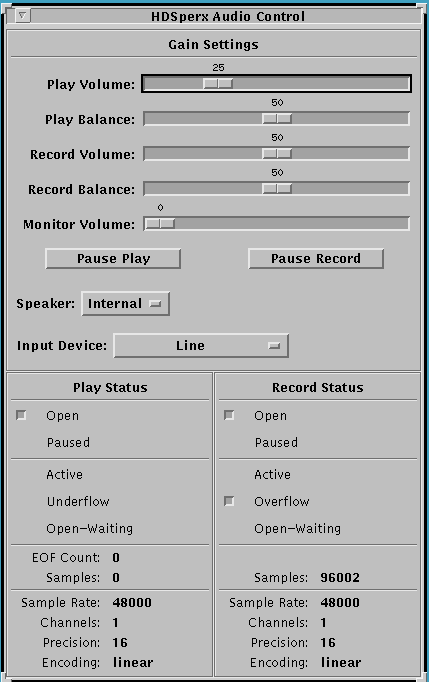
The Audio Control client contains the following entries:
Play Volume: This sets the play volume for the audio output
Play Balance: This sets the right/left balance for stereo sound.
Record Volume: This sets the recording volume.
Record Balance: This sets the recording balance.
Monitor Volume: This controls the amount of input audio to be sent directly to the audio output. This is usually zero.
Pause Play and Pause Record buttons: These permit pausing the play or record functions. If paused, the buttons change to Resume Play and Resume Record.
Audio Out Device: This allows you to specify the Audio Output device you have installed. Options are: HDS Internal Speakers, External Speakers, HDS Headset, and CallPort Spkr/Mic. This selection can also be made in Setup Mode from the User Preferences menu.
Audio In Device: This lets you select the Audio Input device you have installed. Options are: Unspecified, HDS ViewCam, HDS Headset, CallPort Spkr/Mic, HDS Microphone, HDS Tuner, VCR, and Line Level Audio. This selection can also be made in Setup Mode from the User Preferences menu. Refer also to page HDS Audio Hardware Specifications for more detail.
The lower part of the client screen reports settings selected by client resources or on the audio command line, including sampling rates and precision.
Refer to the HDS audio manual pages for details.
Starting the HDS Audio Client
The HDS audio client, like other HDSperx clients, can be started in several ways:
Choosing the `HDS Audio' selection from a local window manager's `HDSperx' menu.
Starting directly from the HDS console window via the `hdsaudio' command.
Starting remotely from a host via the Remote Shell protocol.
(e.g.
rsh -n
testfx "hdsaudio &"
)
The hdsaudio client can be used in conjunction with the HDS NetAudio server.
 Return to the Home Page