Startup Options Selection
The Startup Options menu is shown below:
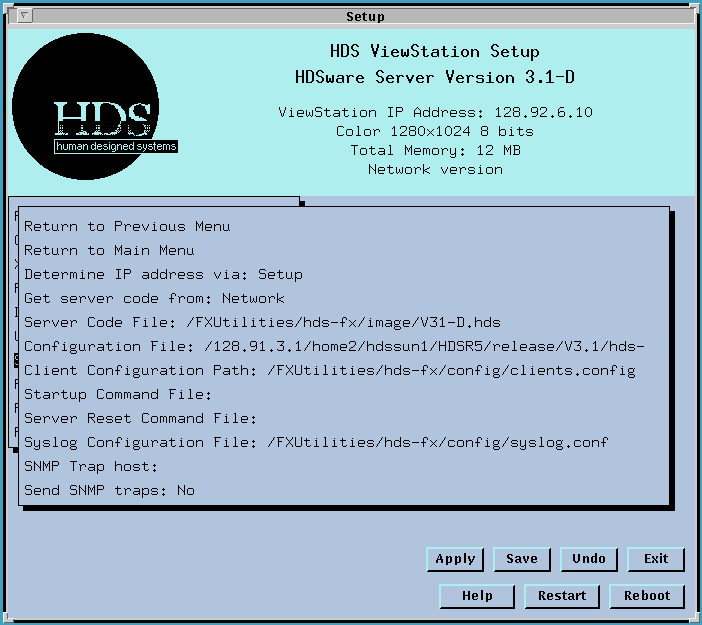
This menu selects whether you operate the ViewStation with the server software stored in flashPROM or whether you load server software from the network as a boot file. The ViewStation's boot up choices are discussed fully in Booting the ViewStation.
The Determine IP address via line has three options: Setup, BOOTP, and RARP. This line lets you select how the ViewStation determines its IP address.
The Setup option lets you set your IP address in Setup Mode (on the HDSware menu) in the conventional way. The assigned IP address and the internal hardware address are registered on the network as needed (usually done automatically by the ARP protocol).
The BOOTP option (the default value) lets you use a BOOTP daemon running on a host on your network to find your IP address (and, optionally, download the server code). If the BOOTP daemon finds the IP address, it is used by the ViewStation. (If downloading the server code was specified, the boot file name and path are optionally supplied by the BOOTP daemon as part of its BOOTP response.)
The RARP option uses the RARP (Reverse Address Resolution Protocol) daemon to determine your ViewStation's IP address at startup. (If the ViewStation knows the IP address of another network host, it uses ARP to find the host's hardware address. If the ViewStation knows its own hardware address, it uses RARP to find its assigned IP address.) The implementation of the RARP daemon varies from system to system and there are many ways of configuring RARP so different file names and syntax rules may apply.
The next field, Get server code from: has two options.
The Network option means that the ViewStation downloads its server code from the network and puts the server code in its RAM memory. Note that the Network option uses the file transfer protocol you've specified and sends a request to the TFTP or FTP daemons running on the network to send the bootfile. The download file name can be specified either with BOOTP (which finds the boot filename as listed in the /etc/bootptab file) or from the default boot file designated in the next entry, the FX Server Code File. Note that a ViewStation with a hard disk drive installed uses a "Network" boot from its IP loopback address (127.0.0.1).
The ROM option means that the ViewStation uses the server code in its flashPROM and loads that into its RAM memory.
The FX Server Code File: field specifies the location of the server image to be downloaded from the network. The path is interpreted using the Local Mount directory as described ViewStation File Access.
The Configuration File: line lets you enter the path to your configuration file. The path is interpreted using the Local Mount directory as described above. The default value is a path specifying your FXUtilities host and the sample configuration file supplied on the HDSware. The configuration file is discussed in more detail in Configuration File.
The Client Configuration Path: field shows the path to your HDSperx clients and their configuration files. The default value is specified by the FX Utilities feature and probably shouldn't be changed. This clients.config file is discussed in more detail in Clients Configuration File.
The Startup Command File: shows the path to your ViewStation startup command file, which specifies special commands and resources used by ViewStation clients. This file is only read when the ViewStation is booted. More details are discussed in Startup Command File.
The Server Reset Command File: shows the path to your ViewStation server reset command file, which contains special commands and resources read by the ViewStation when it resets. This is the recommended place for local commands, like xmodmap, that you use to configure the ViewStation. This is discussed in more detail in Server Reset Command File.
The Syslog Configuration File: shows the host and location of your syslog.conf file, which specifies the type and destination for the ViewStation's error reporting. This is discussed in more detail in Console Window Messages.
The next two fields contain settings related to the SNMP (Simple Network Man agement Protocol) protocol. If your network is running SNMP, you can set these fields. If you don't use SNMP, you can ignore these fields.
The SNMP Trap host field lets you enter the IP address of the host computer collecting SNMP information. This host collects and analyzes data about the network. The ViewStation sends its SNMP message (called a trap) to this location whenever the ViewStation is powered up or restarted, if the Send SNMP Traps field is set to Yes.
The Send SNMP traps field tells the ViewStation whether to send data to the indicated host. The values are Yes and No. If you select the Yes option, the ViewStation sends a "coldstart" SNMP trap to the SNMP host each time the ViewStation restarts. This is a message that the ViewStation is on the network and has just started up.
 Return to the Home Page