Using the HDS Tuner Client
The HDS Tuner allows you to display a live television or cable image on the ViewStation screen. This might be useful for monitoring news feeds or weather information, or closed circuit TV for security monitoring, and so on.
The HDS Tuner consists of a small tuner box, with cables, and a ViewStation local client to control channel selection and tuning.
Connecting the HDS Tuner to the ViewStation
Unpack the HDS Tuner box. There is a separate installation guide for the HDS Tuner. There should be a tuner box, a power transformer and cable, an audio and a video cable, and a special cable to connect to the ViewStation's Serial 1 port.
- Plug in the power from the AC transformer to the tuner (on the side).
- Connect the HDS Tuner's controls to the serial port, "Serial 1", so you can control the tuner from the ViewStation's display. All connectors and adapters are supplied. Connect the other end of the cable to the tuner's special connector.
- Connect the tuner's audio cable to the ViewStation's AUDIO IN connector.
- Connect the tuner's video cable to the ViewStation's VIDEO connector.
- Connect a TV antenna (not supplied) or cable input to the tuner (coaxial connector).
The HDS Tuner Client
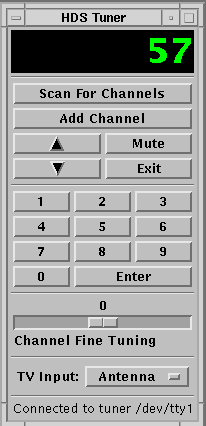
Using the HDS Tuner Client
This is the ViewStation client you use to control the TV/cable input to the ViewStation's video. It looks like a hand-held remote control for your television. Start the HDS Tuner client from the window manager menu. Hold down the right mouse button on the root window and select the HDSperx sub-menu. Click on HDS Tuner.
The HDS Tuner client is a graphical means to control the tuner. It allows you to select channels, scan the channels, etc. just like a hand-held remote control for your TV. The ViewStation controls the HDS Tuner through its serial port connection according to your selections on the ViewStation screen.
When you connect the HDS Tuner for the first time, you should scan the available channels (the available channels depend largely on geographical locations and your antenna or cable connection) so the tuner client can find the available channels. You can use the fine tuning on the tuner client to enhance your reception (these settings are retained by the tuner).
Refer to the HDS Tuner man page for information on preconfiguring the available channel and fine tuning information.
Open the HDS Video client and bring up a video window. With the tuner's output connected to the ViewStation's video port, the ViewStation displays the signal selected by the tuner. You can change the channel with the HDS Tuner client on the ViewStation's display.
HDS Tuner Client Manual Page
This is the HDS Tuner client manual page.
 Return to the Home Page