Using the HDS Movie Client
The HDS Movie client reads and displays Microsoft AVI format movie files transmitted to the ViewStation. These file are compressed using the Intel INDEO compression algorithm. INDEO versions 2.1, 3.1, and 3.2 are supported. Note that the .avi extension does not specify the compression method used in the file.
Microsoft AVI files using different compression schemes are not supported.
The HDS Movie Client
The HDS Movie client offers a number of options:
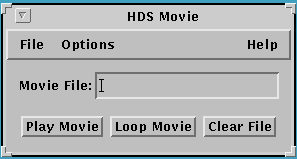
The "File" menu offers a "Quit" option.
The "Options" menu offers a "Video Controls" and an "Audio Controls" submenu, which are discussed below.
The "Help" menu offers a brief description of HDS Movie. There is line to enter the movie file's path and name. Individual buttons allow you to play the movie file, or loop the movie (continuous replay), or clear the file name.
The file should be loaded with FTP or NFS file transfer protocols (TFTP has a 16 MB limitation); FTP usually gives the best performance. The path should use ViewStation file syntax with a host name specified (e.g. /hostname/path/file name).
The Video Controls - HDS Movie Menu
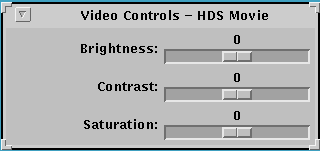
There are three slider bars to control the HDS Movie window - Brightness, Contrast, and Saturation.
The Audio Controls - HDS Movie Menu

The Audio Controls menu lets you select the Output Device and the Play Volume.
The HDS Movie Client
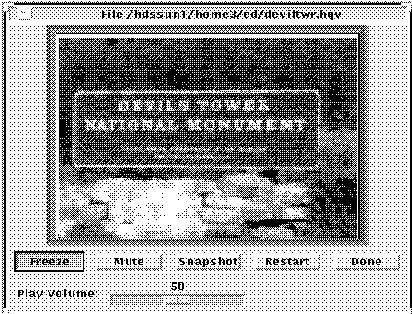
The HDS Movie window displays the movie file. It also offers buttons that let you:
Freeze the movie. This is a toggle button.
Mute the audio. This is a toggle button.
Take a Snapshot of the movie.
Restart the movie. This restarts the movie file at the beginning.
Done, which stops the movie and closes the movie window.
There is also a Play Volume slider bar to select the sound level.
HDS Movie Video Client Manual Page
This is the HDS Movie video client manual page.
 Return to the Home Page