Using the HDSperx Clients
The HDS ViewStation has a powerful processor and an internal Unix architecture that permits the ViewStation X terminal to run a number of important clients on its own display. These clients include the window managers, HDSterm, Setup Mode, Console window, and others.
In addition to these clients, the ViewStation can run other clients, such as a calculators and clocks. These are normal X clients that you may commonly run on your host for display on your X terminal. The HDS ViewStation lets you run these clients locally. This gives you the benefits of easy setup and fast response as well as the savings in host CPU time and host memory, and the reduction of network traffic by having them run on the X terminal.
These HDSperx clients are included on the HDSware tape and are automatically accessible to the ViewStation when you use the HDSware start up feature. The HDSperx clients are available from the root menu of your window manager. All of this setup and configuration is automatic.
Starting the HDSperx Clients
When you use your window manager's root menu (move the pointer to the root window and hold down the left mouse button), you will see HDSperx as its first menu entry. When you move to this entry, another menu appears that contains a list of the HDSperx clients. Select the client you want and release the button. That's all it takes. The new HDSperx client starts and you can use it by moving the pointer to it.
HDSperx Clients
There are a number of HDSperx client application programs. These are listed below with a brief description of their operation and features. They appear automatically on the root menu of your local window manager when you use the HDSware start up feature.
You can add or delete HDSperx clients from the HDSperx menu by adding or deleting them from the ./hds-fx/config/clients.config file. This process is discussed in detail below. For instance, you may choose not to load the tetris and maze clients, or you may want to show only one clock instead of three. You can also modify the client attributes and extend password protection to any or all of these clients.
HDSperx Client Listing
There are many more HDSperx clients, including some clients for Console Window operations. This list is available with the "list" command in the Console Window. It is subject to change with new HDSware releases.
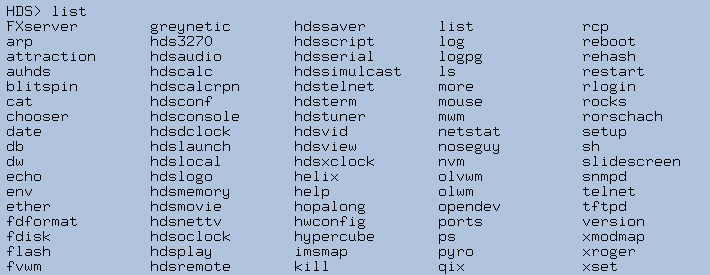
HDSperx Menu
This page discusses the HDSperx menu and installation of the HDSperx clients.
HDSperx Clients Configuration File
This page discusses the clients configuration file for the HDSperx clients. You can customize your HDSperx clients by modifying their app-defaults entries, or names, or paths, or attributes in the clients configuration file.
 Return to the Home Page