Setup Mode Editing
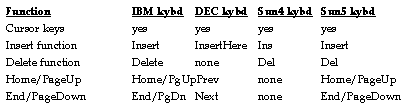
The Setup Mode client has a number of user-defined fields. There is full keyboard editing capability for entries in these fields. The cursor keypad allows you to move the cursor left and right within a field and the up and down arrow keys move the cursor to the beginning and end of the field. The Home, End, Page Up and Page Down keys also move the cursor to the beginning or end of the field.
You can erase a field by pressing Ctrl-U. You can also use the Backspace and Delete keys to delete characters to the left. The Insert key toggles the keyboard into Insert mode. This is especially useful for editing long field entries.
Setup Mode Editing Keys
The editing keypads on the keyboards are active in Setup Mode on most keyboards.
File Names and Paths in Setup Mode
The ViewStation uses an internal file structure which is very similar to NFS, using host names and mount points for easier specification of file names and paths in a complex network environment. A detailed description of these meanings, as well as examples of usage, is found at ViewStation File Structure.
In general, you can specify a file name or a path for Setup Mode fields by using a leading slash, then entering the host name (or IP address), the directory path, and the file name, with each field or directory level separated by a slash. For example,
/<hostname>/<path>/<filename>
or, more specifically,
/hdssun5/usr3/home/openwin/bin/olwm/.openwin-menu

/128.92.3.12/home/usr2/john/budget.doc
The ViewStation understands file names containing all of these elements, with host names as specified in the Remote Hosts menu in Setup Mode (or by some network service) and other entries separated by slashes. Details about other permitted naming techniques, using mount points and Local and Remote Mount Directories, are contained inViewStation File Structure.
FXUtilities
This naming structure has an important special case - "FXUtilities". The FXUtilities abbreviation is used for the HDSware host and HDSware path you specified. This abbreviation is used in the configuration file for specifying the locations of the HDSware software.
 Return to the Home Page