The HDSterm client allows you to select, from the Customize Window General dialog box, whether your keyboard (IBM or DEC type) sends VT320 sequences or the normal keyboard sequences. The "VT On" selection is recommended for HDSterm for both the IBM and DEC keyboards. The actual selections and their corresponding sequences are shown in the tables below.
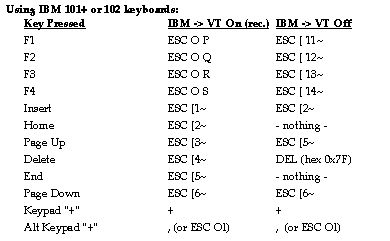
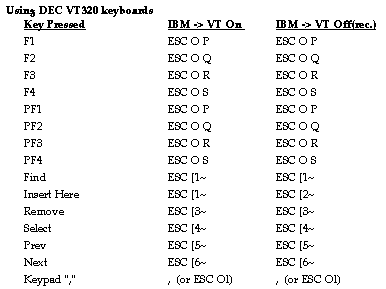
The Numeric keypad sequence depends on whether HDterm is using Numeric or Application mode. In Application mode the sequence is ESC O l, which is uppercase O, not zero, and lowercase L, not one. Note also that using the Meta key (if defined with xmodmap for your keyboard) sets the high bit (8th bit) on for any ASCII character.
 Return to the Home Page