Backing Store and Save Unders Menu
Backing Store/Save Unders submenu lets you select options for the way these memory options are used on the ViewStation.
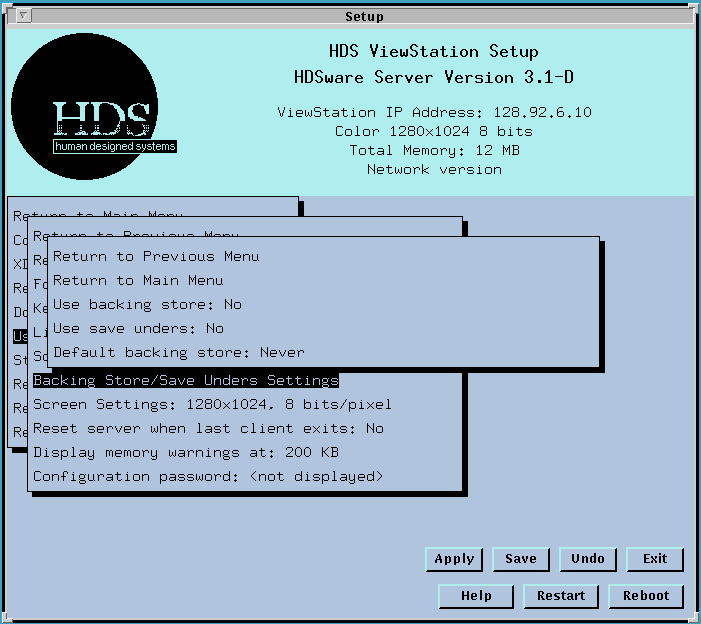
The Use backing store field lets you select whether the ViewStation uses backing store. Another field selects which type of backing store is used and under what circumstances. The options are Yes and No; with a mouse click toggling between the two values. If you select a new value, the new value appears on the line with the note:
Use backing
store: No   (at reset: Yes)
to indicate that the new value will take effect only after the ViewStation server resets, or a restart occurs.
The Use save unders field specifies whether the save unders feature of the View Station is used. The options are Yes and No. Clicking the mouse button toggles between the two settings. A note is added to the entry line that the new value takes effect after server reset.
Note that backing store must be enabled to use save unders. If you select Yes to use save unders, backing store is automatically enabled. In a similar way, if you disable backing store, save unders are also disabled. You may enable backing store and leave save unders disabled.
The Default backing store: field selects the type of backing store function applied to the window on the screen. There are two options: "never", which specifies that backing store is used only if a clients specifically requests it, and "when mapped", which specifies that backing store is used for mapped windows unless the clients specifically sets the backing store attribute for this window "Not Useful". Clicking the mouse button cycles between these choices. The last line shows that the new value becomes effective only after restart.
Notes on Backing Store and Save Under Features
Backing Store is a server function that stores a copy of the contents of a window on the screen in the ViewStation's memory. When that screen window is covered by another window, its contents on the screen are erased. When the window is exposed again (requiring a screen refresh), the window contents are retrieved from the copy in the ViewStation server memory, rather than from the client (over the network). This function reduces network traffic and increases the speed of restoring the window.
Save Unders is a window storage utility similar to backing store, but typically applying to transient events, such as small pop up windows or child windows. Save unders specify that only the portion of a window under a pop up window are saved just before the child window appears, and are redisplayed when the pop up window disappears. This may be thought of as an operating property of the child window rather than the backing store memory storage, which is a property of the window whose contents are saved off screen.
In both cases, backing store and save unders are specified primarily by the client, but the capabilities must be enabled by the Server. If the fields are set to No, neither backing store nor save unders are used. If a client requests them, the Server indicates that they are not available. If the clients don't make specific requests, the ViewStation uses the setting selected in the Default Backing Store field, "never", and "when mapped". The "never" option means that backing store is not used. The "when mapped" option means that the ViewStation uses backing store on all mapped windows.
In practical terms, the speed of redrawing the window depends on the relative speed of reading from memory compared to the speed of redrawing the window from the client over the network. Redrawing from memory is adversely affected by memory fragmentation, especially with large and/or color windows, while redrawing from the network is very dependent on network traffic, host speed and loading, and so on.
Balancing all of these factors, the recommended setting for the ViewStation is both backing store and save unders Yes, but with the Default Backing Store field set to "Never". Your configuration or environment may make other choices more desireable. For example, setting the Default Backing Store to "When mapped" is useful with PPP connections, or with hosts located across one or more gateways.
This suggested setting provides the usefulness of backing store when the client requests it but minimizes the memory utilization on the ViewStation. A client request for (or prohibition of) a different type of backing store is processed correctly unless the previous field says No backing store is to be used.
The Default Backing Store setting "Always" is not supported, since it is contrary to the specification of the X Window System. Forcing Backing Store on client windows which are unmapped is not permitted behavior for an X server and may result in incorrect client behavior. The "When Mapped" setting is the strongest implicit behavior the server can impose on the client.
 Return to the Home Page