The Font Path and RGB Settings line brings up a submenu for specifying the paths to the font files and RGB color definition files you want the ViewStation to use.
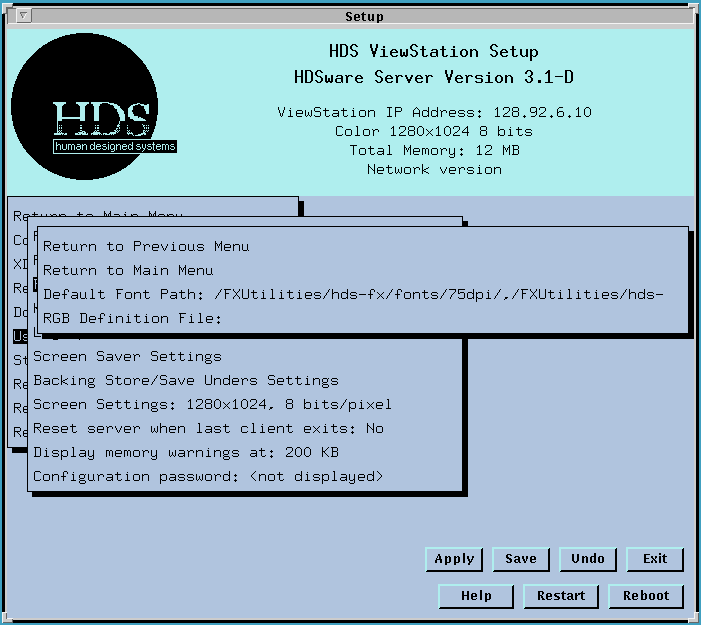
The Default Font Path line lets you enter your fontpaths. You can enter the font paths with the hostname first, then the path name. You can enter more than one host and path, separated by a comma or space. You can also use the Local Mount Directory and Remote Mount Directory features to specify fontpaths, see ViewStation File Access.
If you have problems registering the fontpath, or with loading fonts, refer to ViewStation Font Handling for greater detail.
The RGB Definition File line lets you enter the path to your RGB color definition file (usually called rgb.txt). It works the same way as the fontpath field above.
Note on Downloading the RGB Color Definition File
The HDS ViewStation has the X11R5 standard color name definitions, consisting of more than 700 colors, stored in its server image. It also has the capability to download a user's custom color definition file into memory.
If you want to use a custom color definition file, follow these steps:
First, create a text file containing your color definitions. This is usually named rgb.txt.
Then load the text file into a convenient location on your system and enter the path in the RGB Server line in the User Preferences menu in Setup Mode. A typical rgb.txt file has the following form:
<red>  <green>  <blue>   <name>
<red>  <green>
<blue>   <name>
<red>  <green>  <blue>   <name>
where <red> <green> <blue> are intensity values for each of those colors in the range 0 to 255. The <name> is an arbitrary name given to the color. For example, the colors used for the HDS ViewStation Setup Mode screen are:
143 143 188 light steel blue
175 238 238 pale turquoise
These color names are part of the standard X11R5 color definition file. You use these names in a xterm command line to create a colored window.
These color names can also select gray shades on gray scale monitors. A gray shade is a color designated as a percentage of black/white, such as:
175 175 175 gray67
 Return to the Home Page