Domain Name Servers Selection
The Domain Name Servers Menu is for users who have a Domain Name Server running on their network. The name server daemon reads data from a data file (typically /etc/named.boot) which identifies a name with an IP address, and listens on the network for queries about names.
The ViewStation can use device names for the any of its remote hosts. If a field must have an IP address instead of a name, Setup Mode will prompt you for an IP address when you enter a name.
The Domain Name Server Menu shows:
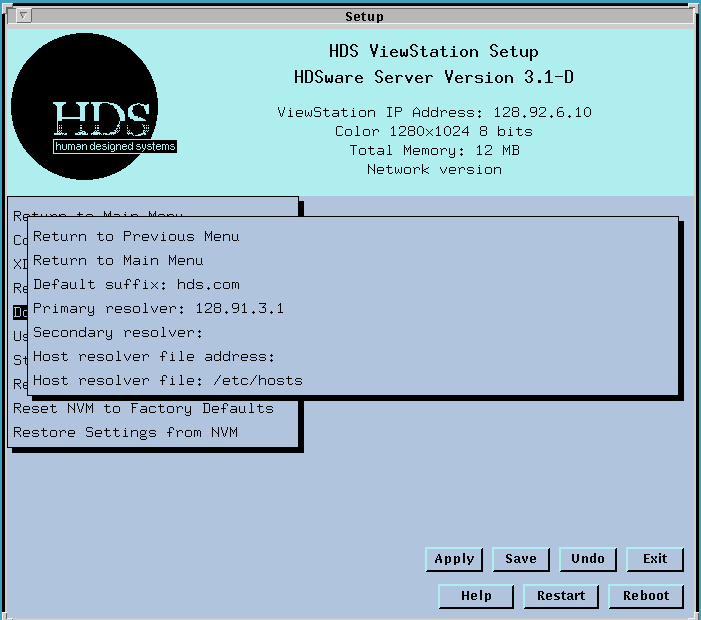
The Default Suffix field gives the ViewStation information about your device names. A large system will have long host names, such as hdssun5.softwarelab.hds.com, so you may want to use the short name for convenience. In this case hdssun5 would be the name you use and the rest of the name, softwarelab.hds.com, would be the suffix. The ViewStation automatically adds this suffix to the names you use when it sends the request to the name daemon on the network.
Be careful to name your hosts so you can communicate with other hosts in the local domain (all hosts with the same suffix) easily and not exclude other hosts and names by having the incorrect suffix.
The Primary Resolver field is the IP address of the host computer which is running the name daemon and will try to resolve the names you send on the network. This entry must be an IP address, not a name.
The Secondary Resolver field is the IP address of another host computer which listens for name queries and can interpret names. This host computer is a backup for the Primary resolver.
The Host resolver file address field gives the IP address of the host computer the ViewStation uses for its own address resolution. It will look at the hosts table, typically /etc/hosts, on this computer for address resolution.
The Host resolver file field gives file name of the host resolver file, typically /etc/hosts, on the specified host.
 Return to the Home Page