PPP Configuration and Network Routes
Support for network routes is available with HDSware version 3.2 and higher. Earlier HDSware versions used the resource:
HDSsetup.remote.serial1.netmask
to establish a network route for SLIP or PPP. This has been replaced with two resources:
HDSsetup.serial1.add.network.route
(default NO)
HDSsetup.serial1.add.default.gateway (default YES)
The first setting lets you add a specific network route; the default setting of No disables the feature. The second setting allows you to set the ViewStation's gateway as the remote host's IP address; this field is not available from Setup Mode. More complicated network configurations are discussed below.
Typical PPP Configurations
There are several possiblities for using the ViewStation in a PPP environment. There are three possibilities for an IP address and nine possibilities for a network, which are described below. Most cases are handled correctly with the ViewStation's default assignments.
For instance, connecting a ViewStation from your home to the subnet in your office, or connecting from your office subnet to another subnet, or connecting from your office subnet to the Internet are all handled correctly with the ViewStation's default configuration. If you have more complicated network arrangements, look at the definitions and tables below:
Leaf - an isolated host
Subnet - a network completely specified by one netmask (all hosts on the subnet have IP addresses that match the netmask and all IP addresses that match the netmask are found on the subnet [including gateways])
Internet - all other networks
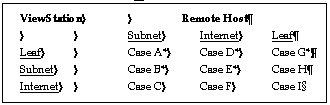
* indicates that the default settings on the ViewStation will work correctly unless multiple PPP interfaces are running.
Case A: the ViewStation is a leaf and connects to a subnet -- ViewStation default configuration works correctly
Case B: ViewStation is on a subnet and connects to a subnet
o Standard configuration (one PPP connection): -- Remote host is default gateway should be Yes (default); Add network route should be No (default)
o Alternate configuration (multiple PPP connections):
-- Remote host is default gateway should be No; Add network route should be Yes
Case C: ViewStation is on an internet and connects to a subnet -- Remote host is default gateway should be No; Add network route should be Yes
Case D: ViewStation is a leaf and connects to an internet -- Remote host is default gateway should be Yes (default); Add network route should be No (default)
Case E: ViewStation is on a subnet and connects to an internet -- Remote host is default gateway should be Yes (default); Add network route should be No (default)
Case F: ViewStation is on an internet and connects to an internet -- You will have to add host or net routes manually using the ViewStation's local route command
Case G: ViewStation is a leaf and connects to a leaf -- Remote host is default gateway should be No; Add network route should be No (default)
Case H: ViewStation is on a subnet and connects to a leaf -- Remote host is default gateway should be No; Add network route should be No (default)
Case I: ViewStation is on an internet and connects to a leaf -- Remote host is default gateway should be No; Add network route should be No (default)
 Return to the Home Page