As a convenience to users, the HDS ViewStation uses a number of special keystrokes for various functions. These are listed below, along with their variations on optional keyboards. These key definitions apply only in the clients indicated and only under the correct circumstances.
Setup Mode Keystrokes
Setup Mode Editing Keys: The editing keypads on the keyboards are active in Setup Mode on most keyboards.
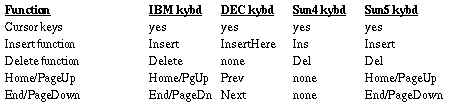
Setup Mode Hidden Icon Hotkey: If you have the Setup Mode resource set to "Hide Icon", Setup Mode doesn't appear on the screen unless you hit the Setup Mode hotkey. This is a definable key sequence which you can set with the hotkey resource in the Setup client's defaultArgs table in the ./hds-fx/config/clients.config file:
hds.client.setup.defaultArgs: -xrm `*hotkey: Shift Alt<key>F1'
In this example the new hotkey would be Shift-Alt-F1. The default assignments for the hotkeys are as follows:

Boot Monitor Keystrokes
When you first turn on the ViewStation, the white screen you see is called the Boot Monitor. If you want to go directly to Monitor Mode to make your settings, you can press the "m" key while the "Initializing" message is displayed (3 seconds); otherwise you have to wait until the boot process finishes in order to get into Monitor Mode.
There are two other keystrokes that can be useful, a "Pause" function to pause (and resume) the boot process, and a "Debug message" function to display more detailed messages (two levels of debug messages, activated with one or two keypresses).

HDSterm Environment Variable Keystrokes
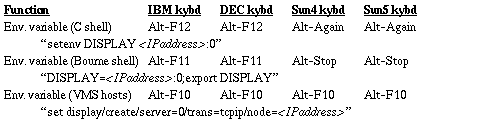
You have to set your environment variable when you login into a host computer so the computer can send the application client windows to the proper display. The ViewStation's Telnet clients (HDSterm and tty Telnet) have special key definitions to make this setting easy for you. These definitions automatically insert the IP address of your ViewStation. There are settings for several different environments.
 Return to the Home Page