There are several considerations with changing monitors on the ViewStation.
1. Video memory:
The ViewStation can have either 1 MB or 2 MB VRAM configurations, based on its initial factory monitor type. The 1 MB configuration supports monochrome monitors at all resolutions up to 1280x1024 and color (and grey-scale) monitors at 1024x768 resolution. Higher resolution color (or grey-scale) monitors require the 2 MB VRAM configuration; this is a factory upgrade to the ViewStation base. You can see the memory available on your ViewStation by using the "hwconfig" command from the ViewStation's Console Window.
2. Cable Type:
The ViewStation base uses a DB-15 VGA-type connector for its video output, with standard VGA pin assignments, for all monitors. The ViewStation is shipped with a cable appropriate for the initial factory monitor type. Some monitors have attached cables, others use special connectors, or 1, 3, or 5 BNC connectors. It is important to check the cable type and verify the pin assignments when using a new monitor.
Click to see the ViewStation's video connector pin assignments; consult the monitor manuals for the video connector signals needed on the monitor side.
3. Signal Frequency:
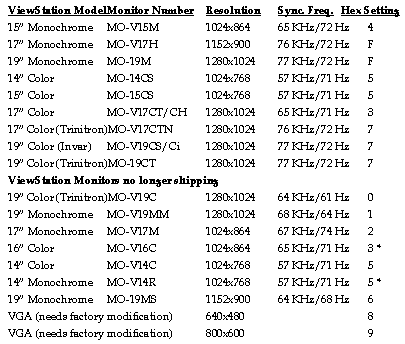
In order to support the high resolution of the monitors and give sufficient refresh speed to be free of flicker, ViewStation monitors run at relatively high signal frequencies (for example, IBM personal computer VGA monitors run at 31.5 KHz, while ViewStation monitors typically run in the 70 KHz range). Specific monitor frequencies are given in the table below, and a supported frequency is selected by the hex-switch setting on the circuit board.
There are other considerations about the video signal that present additional compatibility problems. Consult with HDS Technical Support for more details on these differences. There are three main areas of signal compatibility beyond sync frequency; whether the monitor uses sync on green signals, the polarity of the sync signal, and grey-scale/color mappings.
If you want to change the monitor on your ViewStation base, verify that there is sufficient VRAM to support the desired resolution, verify the correctness of the video cabling, and select the correct signal frequency in the ViewStation.
Selecting the hex-switch setting:
Disconnect the power to your ViewStation and remove the base's cover. A small round switch (numbers 0 to F on the top) is located toward the left rear of the circuit board. Simply turn the white dot to the desired setting. Be sure to cycle the power to both the ViewStation and the monitor any time you change this setting. Be careful in selecting the switch setting - you can damage the monitor if you select the wrong cable or setting. HDS cannot accept responsibility for unsupported monitors or configurations.
 Return to the Home Page