The following table shows monitors currently supported by HDS. Monochrome and grey-scale monitors typically differ only in the amount of VRAM present.
Note that the sync frequency varies with the resolution (which is user-selectable) of the monitor; the values below are the HDS factory setting. Some multi-sync monitors have a frequency shown which is the HDS factory specification appropriate for optimum display characteristics. A * indicates that a jumper is needed.
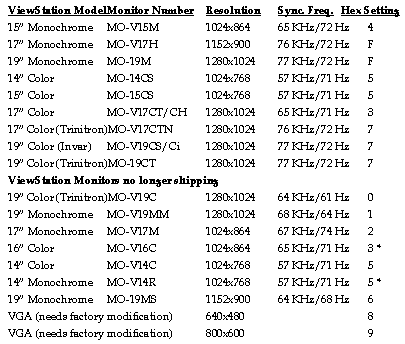
The ViewStation produces video signals with separate sync signals or composite sync on green. Selecting JP12 3-4 on the ViewStation FX (JP 13 on the LX series, and JP13 on the Ultra series) turns off the sync on green signal (hex switch 5 video automatically shuts off sync on green).
The ViewStation uses negative polarity for its video signals. You can select positive polarity with jumpers on the main board in JP9 for the ViewStation FX (JP12 for the LX series, and JP 11 for the Ultra series), which is located near the round hex switch. To select positive polarity:
HSYNC - install jumper 1-2
VSYNC - install jumper 3-4
All monochrome monitors select grey-scale operation automatically, except the MO-V14R, which requires JP13 5-6.
 Return to the Home Page